I was setting up a new Linux box, OpenSuse 11 the other day, and was about to install some third party driver on this box. I was busy and did not get any chance to go any further. I have been absolutely swamped lately :( so, when trying to install module, I found that there is no ko file, instead, they shipped me source code and let me build them myself. It's no pain at all, but I could not remember how to compile and make linux kernel module. I know, I dont like Linux at all, but I am so glad it's an opensource project to keep everything open and freely. I found an excellent online document for not just making/compiling kernel module, but also how to start do kernel programming -
http://tldp.org/LDP/lkmpg/2.6/html/lkmpg.html
Thank you Peter Jay Salzman!! very well done!
Wednesday, April 13, 2011


Thursday, August 12, 2010
how to customize icon for the drive or folder...
I know it's not easy.... but here you go -
1. Use Icon Composer (under Developer/Applications/Utilities) to make a new icon if you do not have one.
Lets say you make a new icon named 1.icns
2. Fire up terminal and transfer this 1.icns to the target drive/volume. For example "USBFW300"
you will also need to change this icon name to ".VolumeIcon.icns"
In terminal type in:
cp 1.icns /Volumes/USBFW300/.VolumeIcon.icns
. is the hidden file indicator to tell OS this is a hidden file from Finder, that being said you will not be able to change 1.icns
name to .VolumeIcon.icns if you plan to do that from Finder. Must done in Terminal.
If you have the developer tools installed, fire up a terminal window and type:
/Developer/Tools/SetFile -a C "/Volumes/[volume name]/"
For example, for the volume "USBFW300" the command is
/Developer/Tools/SetFile -a C "/Volumes/USBFW300/"
then in terminal, type in
"killall Finder" --> this command is to refresh Finder then the new icon will show up.
1. Use Icon Composer (under Developer/Applications/Utilities) to make a new icon if you do not have one.
Lets say you make a new icon named 1.icns
2. Fire up terminal and transfer this 1.icns to the target drive/volume. For example "USBFW300"
you will also need to change this icon name to ".VolumeIcon.icns"
In terminal type in:
cp 1.icns /Volumes/USBFW300/.VolumeIcon.icns
. is the hidden file indicator to tell OS this is a hidden file from Finder, that being said you will not be able to change 1.icns
name to .VolumeIcon.icns if you plan to do that from Finder. Must done in Terminal.
If you have the developer tools installed, fire up a terminal window and type:
/Developer/Tools/SetFile -a C "/Volumes/[volume name]/"
For example, for the volume "USBFW300" the command is
/Developer/Tools/SetFile -a C "/Volumes/USBFW300/"
then in terminal, type in
"killall Finder" --> this command is to refresh Finder then the new icon will show up.
Wednesday, December 23, 2009
Joomla installation tips
If you get the message from browser:
Access Restricted
Most of time, you should try different version of Joomla, for example I got big problem with 1.5.15, could not figure it out, surf on the Internet for 2 days and got no help. Many ppl got this issue.
I finally download 1.5.14, problem solved by itself :( man...... took me more than 10 hours...
================================================
Go to
http://localhost/yourdomain/installation/index.php
and select language
================================================
After choosing language, if you see Cookies error like session.save_path error, you need to make sure the followings:
1. php.ini did specify the path for session.save_path
for example:
session.save_path = "c:\php\sessions"
2. and make sure you enable "write" permission for IUSER for this sessions folder that you created by your own.
3. make sure you spell sessions folder name correctly.
4. you may want to copy php.ini to windows folder as well.
for more info -
http://forum.joomla.org/viewtopic.php?f=429&t=278785
http://www.webcheatsheet.com/php/install_and_configure.php#create
==================================================
database type: mysql
host name: localhost
username: root
password: blank
joomla account and password: admin / you need to specify the password
==================================================
if you get: "JError Unable to load Database Driver" while loading the page
---> database setup has been wiped out in configurationi.php in joomla root folder/
for more info - http://forum.joomla.org/viewtopic.php?f=431&t=257653
if you just install it, you can re-install everything again.
==================================================
Access Restricted
Most of time, you should try different version of Joomla, for example I got big problem with 1.5.15, could not figure it out, surf on the Internet for 2 days and got no help. Many ppl got this issue.
I finally download 1.5.14, problem solved by itself :( man...... took me more than 10 hours...
================================================
Go to
http://localhost/yourdomain/installation/index.php
and select language
================================================
After choosing language, if you see Cookies error like session.save_path error, you need to make sure the followings:
1. php.ini did specify the path for session.save_path
for example:
session.save_path = "c:\php\sessions"
2. and make sure you enable "write" permission for IUSER for this sessions folder that you created by your own.
3. make sure you spell sessions folder name correctly.
4. you may want to copy php.ini to windows folder as well.
for more info -
http://forum.joomla.org/viewtopic.php?f=429&t=278785
http://www.webcheatsheet.com/php/install_and_configure.php#create
==================================================
database type: mysql
host name: localhost
username: root
password: blank
joomla account and password: admin / you need to specify the password
==================================================
if you get: "JError Unable to load Database Driver" while loading the page
---> database setup has been wiped out in configurationi.php in joomla root folder/
for more info - http://forum.joomla.org/viewtopic.php?f=431&t=257653
if you just install it, you can re-install everything again.
==================================================
Friday, June 26, 2009
My new toy, Epson 3800.


I bought a brand new epson 3800 about 2 months ago and  it's been incredible.
The cartridges last longer than my 4-year-old R2400. I've been printing like crazy from 5x7's to 17x22's for my families and clients.
Love it.Thursday, June 25, 2009
Good-Bay Michael Jackson
 Back to late 80, I worked for his team.
1,000 dollars per day. YES, 1000 dollars!
Good-Bay Michael!
Thursday, February 12, 2009
Convert YouTube to MP3
http://www.flvto.com/
Good tool.
Basically it read the Flash file and separate the video and audio streams, then covert Audio stream to MP3.
Good tool.
Basically it read the Flash file and separate the video and audio streams, then covert Audio stream to MP3.
Friday, February 6, 2009
Windows 2003 64-bit server + IIS 6.0 + MS Access + ODBC 32 bit
1. To enable IIS 6.0 to run 32-bit Web applications on 64-bit Windows, here is the workaround:
More reference: http://support.microsoft.com/default.aspx?scid=kb%3Ben-us%3B894435
2. I cannot see MS Access driver (*.mdb) in ODBC manager? only SQL server driver?
This is because you need to install MS Office/Access to get the driver first, then run 32-bit ODBC manager -
• The 32-bit version of the Odbcad32.exe file is located in the %systemdrive%WindowsSysWoW64 folder.
• The 64-bit version of the Odbcad32.exe file is located in the %systemdrive%WindowsSystem32 folder.
Reference: http://support.microsoft.com/kb/942976/en-us
3. I got the error message on web page while trying to access database through ASP page -
"Selected collating sequence not supported by the operating system"
This is because the wrong language setting of Access mdb file which was created under different
language version of Access before.
The easier way is to create a new database file, mdb, and copy structure and data from old mdb file. This must be done in English version Access.
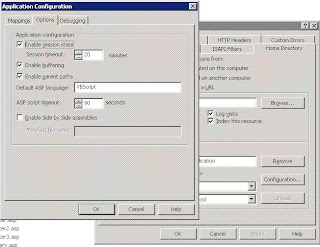
4. I can run ASP file, but other ASP files in sub folders cannot be launched. This is because in IIS6 or above you need to enable ASP files which are located in sub-folders. You can login to IIS, right click on website and follow the steps here -
- Open a command prompt (cmd) and navigate to the %windir%\Inetpub\AdminScripts directory.
- Type the following: cscript.exe adsutil.vbs set W3SVC/AppPools/Enable32BitAppOnWin64 “true”
- Press ENTER.
- If you get the following error:
========================
Type Mismatch
ErrorNumber: 13(0XD)
========================
Try 1 instead of "true" - cscript.exe adsutil.vbs set W3SVC/AppPools/Enable32BitAppOnWin64 1
More reference: http://support.microsoft.com/default.aspx?scid=kb%3Ben-us%3B894435
2. I cannot see MS Access driver (*.mdb) in ODBC manager? only SQL server driver?
This is because you need to install MS Office/Access to get the driver first, then run 32-bit ODBC manager -
• The 32-bit version of the Odbcad32.exe file is located in the %systemdrive%WindowsSysWoW64 folder.
• The 64-bit version of the Odbcad32.exe file is located in the %systemdrive%WindowsSystem32 folder.
Reference: http://support.microsoft.com/kb/942976/en-us
3. I got the error message on web page while trying to access database through ASP page -
"Selected collating sequence not supported by the operating system"
This is because the wrong language setting of Access mdb file which was created under different
language version of Access before.
The easier way is to create a new database file, mdb, and copy structure and data from old mdb file. This must be done in English version Access.
4. I can run ASP file, but other ASP files in sub folders cannot be launched. This is because in IIS6 or above you need to enable ASP files which are located in sub-folders. You can login to IIS, right click on website and follow the steps here -

Subscribe to:
Posts (Atom)